HDMI eARC vs Optical Audio Cable: Which Delivers Better Home Theater Sound?

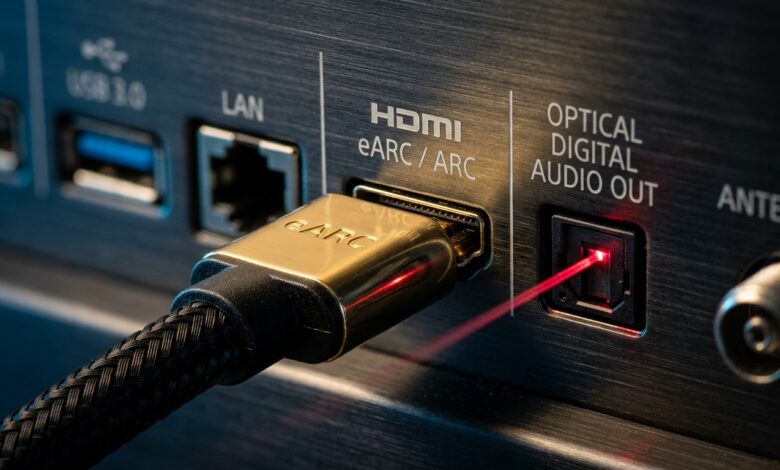
When connecting a modern 4K Smart TV to an external soundbar or AV receiver, you are almost always faced with two primary digital connections: an optical Toslink port and an HDMI eARC port. Both deliver digital audio directly to your sound system, but comparing HDMI eARC vs optical audio reveals a massive generational gap in bandwidth, surround sound codecs, and everyday convenience. Choosing the wrong connection can quietly bottleneck premium sound systems, downgrading uncompressed multi-channel cinema audio into basic compressed stereo.
What Is Optical Audio (Toslink)?
Originally developed by Toshiba in 1983, the optical Toslink connection transmits digital audio data using pulses of red LED light through a fiber-optic glass or plastic cable. Because it relies on light rather than electrical current, optical cables are completely immune to electromagnetic interference, radio frequency noise, and ground loops that cause speaker hum.
However, optical cable technology was designed during the early CD era. Its physical bandwidth is capped at approximately 384 kilobits per second (Kbps). While this is plenty for two-channel uncompressed stereo PCM audio and legacy compressed 5.1 Dolby Digital or DTS surround sound, it cannot transmit modern high-resolution formats like Dolby TrueHD, DTS-HD Master Audio, or uncompressed Dolby Atmos.
What Is HDMI eARC?
HDMI ARC (Audio Return Channel) was introduced in 2009 with HDMI 1.4, allowing TV audio to travel backwards through the same HDMI cable connected to a media player. In 2017, the HDMI 2.1 specification introduced eARC (Enhanced Audio Return Channel), dramatically supercharging bandwidth from 1 Mbps up to a staggering 37 megabits per second (Mbps).
This nearly forty-fold increase in bandwidth allows HDMI eARC to transmit 32 channels of uncompressed 24-bit/192kHz digital audio. If you stream content containing Dolby Atmos or play games on next-gen consoles, eARC delivers the full, lossless studio mix without lossy compression.
Direct Side-by-Side Comparison
| Feature | Optical Toslink | HDMI eARC |
|---|---|---|
| Maximum Bandwidth | ~384 Kbps | Up to 37 Mbps |
| Uncompressed Stereo (PCM) | Yes (2.0 channels) | Yes (Up to 7.1 channels) |
| Dolby Digital / DTS 5.1 | Yes (Lossy compressed) | Yes (Lossless uncompressed) |
| Dolby Atmos Support | No (Unsupported) | Yes (Lossless TrueHD / Atmos) |
| Single Remote Volume Control (CEC) | No (Requires soundbar remote) | Yes (TV remote controls audio volume) |
| Lip-Sync Correction | Manual TV setting | Automatic hardware sync |
| Cable Type Required | Standard optical fiber | Ultra High Speed HDMI (48Gbps) |
Everyday Convenience: The HDMI-CEC Advantage
Beyond acoustic fidelity, the biggest practical benefit of HDMI eARC is Consumer Electronics Control (HDMI-CEC). When you connect your soundbar via eARC, your television and audio receiver communicate bi-directionally over a dedicated data channel.
- Single Remote Operation: Raising the volume with your television remote immediately adjusts the soundbar volume. You do not need a second remote cluttering your coffee table.
- Synchronized Power: Turning off your television automatically puts the soundbar into standby mode, preventing accidental overnight power consumption.
- Automatic Lip-Sync Compensation: HDMI eARC includes mandatory hardware lip-sync correction, eliminating annoying audio delays where spoken dialogue lags behind actor mouth movements.
When Should You Still Use Optical?
While HDMI eARC is objectively superior for modern setups, optical cables remain extremely useful in specific scenarios. If you own an older legacy AV receiver that lacks HDMI ports, optical provides reliable 5.1 surround sound. Furthermore, if your TV has only two HDMI ports and both are occupied by gaming consoles or streaming boxes, using optical frees up an HDMI port for video inputs.
👉 Read Next: Deciding whether to upgrade your living room speakers? Check our complete analysis on soundbar vs TV speakers: is a dedicated soundbar worth it?
Browse our full collection of display calibration tips, acoustic setups, and home cinema hardware guides in the entertainment guides hub.