When assembling a competitive gaming setup or home office workstation. Your keyboard represents your primary physical interface with your computer. Navigating the mechanical vs membrane keyboard debate is essential for any PC gamer seeking faster keystroke registration, comfortable ergonomics. Long-term hardware reliability.
While basic membrane keyboards ship as standard peripherals with prebuilt office computers. Mechanical keyboards have developed an enthusiastic global following among gamers, software engineers. Writers. However, mechanical keyboards cost significantly more than traditional rubber-dome alternatives. In this comprehensive comparison, we break down switch actuation physics, compare input latency, analyze key rollover capabilities. Help you select the ideal typing mechanism for your gaming needs.
Mechanical vs Membrane Keyboard Switch Mechanics Compared
Membrane keyboards utilize three stacked flexible plastic layers that span across the entire keyboard frame. A top conductive membrane sheet is separated from a bottom circuit board by a perforated spacer layer. Directly beneath each plastic keycap sits a small silicone or rubber dome.
When you press a key, the descending rubber dome collapses downward. Pushing a conductive carbon contact on the top sheet through the hole to touch the bottom circuit trace. This completes an electrical circuit, registering the keystroke. Because the rubber dome must collapse completely against the circuit board. You must press every key all the way down to the bottom (bottoming out). Consequently, typing on membrane keyboards can feel mushy, soft, and tiring during extended typing marathons.
How Mechanical Keyboards Work: Dedicated Precision Switches
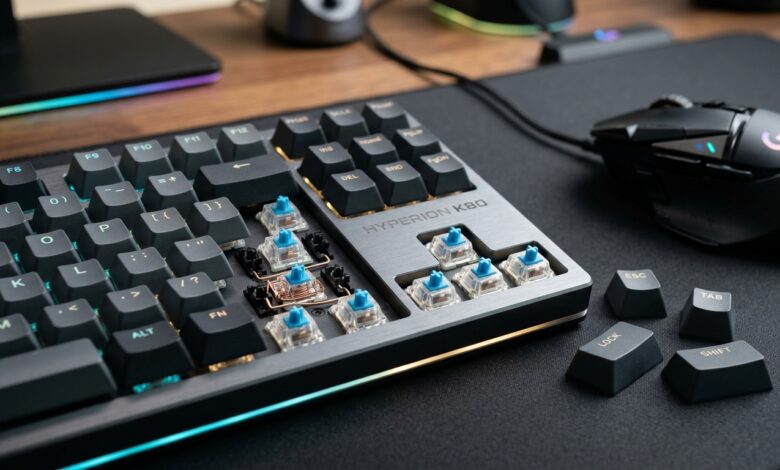
In contrast to a continuous sheet of rubber domes. Mechanical keyboards feature an individual, self-contained mechanical switch beneath every single keycap. Each switch houses a plastic stem, a metal contact leaf. A precision steel spring inside a durable plastic housing.
Crucially, mechanical switches register a keystroke at the actuation point (typically around 1.5 to 2.0 millimeters of travel). Long before the key physically bottoms out against the backplate. As a result, competitive gamers can register rapid commands with minimal physical effort. Mechanical switches fall into three distinct tactile categories:
- Linear Switches (Red): Smooth, consistent keystroke travel from top to bottom without tactile bumps or clicks. Highly favored by esports players for ultra-fast double-tapping in first-person shooters.
- Tactile Switches (Brown): Features a subtle physical bump at the exact moment of electrical actuation. Providing instant feedback without loud acoustic clicking. Excellent for both gaming and daily typing.
- Clicky Switches (Blue): Produces a prominent tactile bump accompanied by a sharp, crisp acoustic click sound. Loved by touch typists, though often considered too loud for open offices.
Technical Benchmark: Mechanical vs Membrane Keyboards
| Performance Attribute. | Membrane Keyboard. | Mechanical Keyboard. |
|---|---|---|
| Switch Lifespan. | 5 to 10 million keystrokes. | 50 to 100 million keystrokes. |
| Actuation Feedback. | Mushy bottom-out required. | Precise actuation before bottoming out. |
| Key Rollover (N-Key Rollover). | Limited (3 to 6 key ghosting risk). | Full NKRO (press unlimited keys simultaneously). |
| Input Latency. | 15ms to 30ms. | 1ms to 5ms (high polling rates). |
| Customization & Repair. | Non-modular; replace entire board. | Swappable keycaps & hot-swap switches. |
| Price Range. | Affordable ($15 to $40). | Moderate to Premium ($50 to $200+). |
Gaming Advantages: N-Key Rollover and Anti-Ghosting
One of the most decisive advantages mechanical keyboards offer gamers is robust anti-ghosting and Full N-Key Rollover (NKRO). In complex titles like Fortnite or Valorant. Players frequently hold down W and Shift to sprint while simultaneously pressing C to crouch and Spacebar to leap.
Because membrane keyboards share intersecting electrical traces on a single plastic sheet. Pressing three adjacent keys can confuse the controller, failing to register subsequent inputs (ghosting). In contrast. Every mechanical switch operates on its own dedicated diode circuit. You can press dozens of keys simultaneously and every single input will register flawlessly.
If you game casually on a strict budget, a quiet membrane keyboard provides adequate functionality. However, if you spend hours gaming or typing daily. Investing in a mechanical keyboard delivers unmatched responsiveness, finger comfort. Durability. For related gaming hardware optimizations, read our comprehensive guide on monitor response time vs refresh rate. Therefore, for more equipment tutorials, check our complete gaming guides hub.